
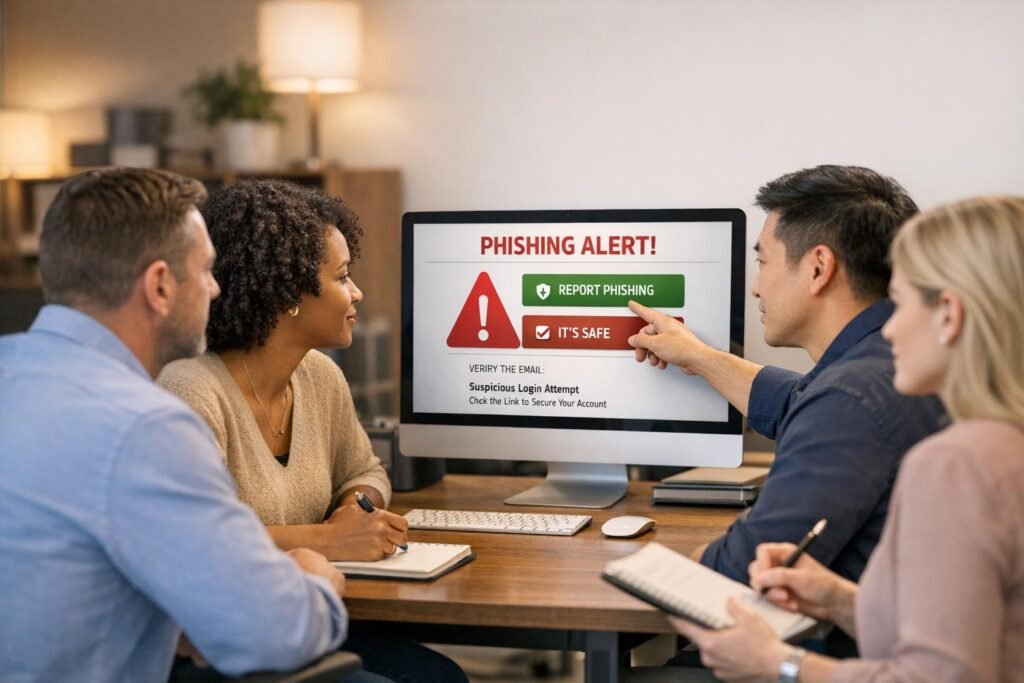
Phishing is one of the most common cyber threats, accounting for 91% of all cyberattacks. Training your team to recognize and report phishing attempts can dramatically reduce your organization’s risk. Here’s a quick summary of how to do it:
- Set Up Easy Reporting Channels: Add a "Report Phishing" button in email clients and create a dedicated email address like
security@company.com. - Teach Recognition Skills: Train employees to spot suspicious signs like urgent language, mismatched domains, or fake QR codes.
- Run Phishing Simulations: Test employees with realistic scenarios to improve their awareness and reporting habits.
- Encourage Reporting Without Fear: Build a no-blame culture where employees feel safe reporting mistakes.
- Track Metrics: Measure reporting rates, time-to-report, and real threat detection to monitor progress.
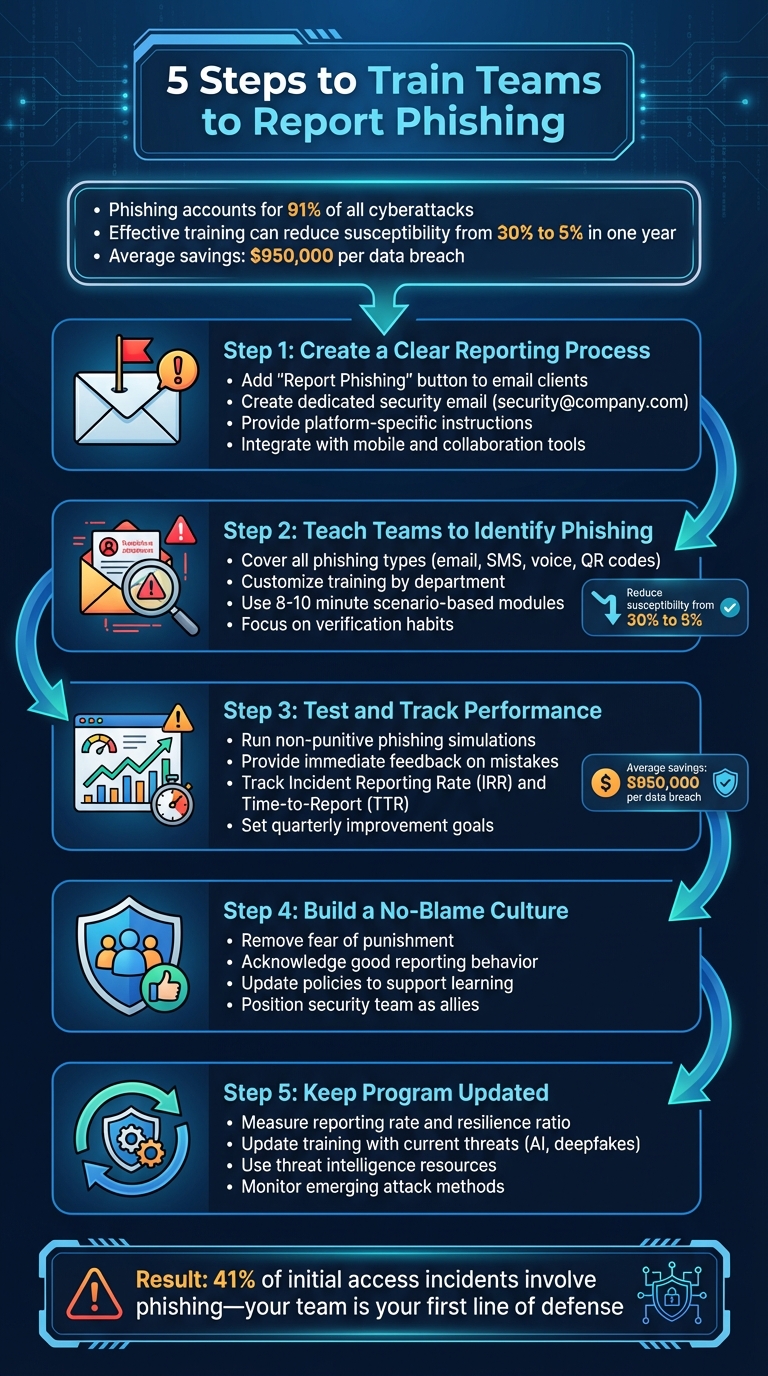
5-Step Process to Train Teams to Report Phishing Attempts
Step 1: Create a Clear Reporting Process
Set Up Standard Reporting Channels
Making it easy for employees to report phishing attempts is key to staying ahead of threats. Start by incorporating a "Report Phishing" button into your email client’s toolbar. With a single click, users can send crucial email header data directly to your security team, helping them trace and block potential threats. For example, one company found that while filters stopped most phishing emails, this button allowed users to identify and report 25 out of 50 new threats.
In addition to the button, create a dedicated email address, like security@company.com, that’s simple to remember. Link this email to your IT ticketing system so every report generates a trackable case. This setup not only organizes potential threats but also lets your team analyze patterns over time. Lastly, provide clear, step-by-step instructions tailored to different user environments.
Write Clear Reporting Instructions
Make sure your instructions are specific to the email client your employees use. For instance:
- Outlook: Advise users to "Save As" the suspicious email as a file, then attach it to a new email and send it to the security team.
- Gmail: Instruct users to click "Show Original", then "Download Original", and forward the file to your security team.
- Mac Mail: Teach users the Control+Command+J shortcut to create a new message with the original email attached.
Reinforce one golden rule: never click on links or reply to suspicious emails. Instead, verify requests through a known contact. For example, call the sender using a trusted phone number rather than relying on the one provided in the email. These steps should be seamlessly integrated into your existing systems to ensure smooth adoption.
Add Reporting Tools to Existing Systems
Your reporting process should work across all platforms – desktops, mobile devices, and collaboration tools. Ensure the "Report Phishing" button and forwarding address are accessible on mobile devices, and integrate reporting tools into platforms like Slack, Microsoft Teams, or your internal communication system.
Consider setting up an internal "phish bowl" where verified phishing attempts are displayed for employees to see and discuss. The aim is to eliminate any obstacles between spotting a suspicious email and reporting it to your security team.
Step 2: Teach Teams to Identify and Report Phishing
Cover Common Phishing Types
Once you’ve set up reporting channels, the next step is to train your teams to spot phishing attempts. Start by covering the most common types of phishing attacks employees are likely to encounter. For instance, deceptive phishing – where attackers pose as trusted brands to steal credentials or payment details – is a frequent threat. But don’t stop there. Employees also need to understand Business Email Compromise (BEC), where scammers impersonate executives or vendors to authorize fraudulent wire transfers. A stark example of this occurred in 2016, when Austrian aeronautics company FACC lost over €42 million after attackers, posing as the CEO, tricked the finance department into wiring funds for a fake acquisition.
Expand the training to include all communication methods. Smishing (phishing via SMS) and vishing (phishing via voice calls) are on the rise. Attackers are even leveraging tools like Microsoft Teams to impersonate IT support and gain remote access. Another sophisticated method is quishing, where malicious QR codes redirect users to fake websites. These codes are turning up in unexpected places, like parking meters and emails, making them harder to detect than traditional phishing links.
The stakes couldn’t be higher: ransomware is found in over 97% of phishing emails, and just one successful attack can result in staggering losses. Teach employees to avoid relying solely on HTTPS or the padlock icon as signs of a secure site – cybercriminals can now easily obtain SSL certificates to make fraudulent sites appear legitimate.
By understanding these threats, your team will be better equipped to stay vigilant. The next step is tailoring this training to address the specific risks each department faces.
Customize Training by Department
A one-size-fits-all approach to phishing training just doesn’t work. Different departments encounter different threats, so your training should reflect those unique risks. For instance, your finance team needs to focus on spotting fake wire transfer requests and vendor impersonation attempts. Meanwhile, HR staff should be trained to identify phishing disguised as job applications or benefits inquiries. Customer support teams, on the other hand, often deal with messages that appear to be from clients but are actually social engineering attempts.
Tailored training has a measurable impact. Companies that implemented role-specific training saw breach costs drop by $950,000, from $5.10 million to $4.15 million. Start by conducting unannounced phishing simulations to gauge each department’s baseline risk level. Then, customize training content to reflect the specific types of data and systems each team handles. For example, accounting staff could receive simulated "urgent invoice" phishing emails, while HR might encounter fake "employee complaint" messages.
To further refine your efforts, assign human risk scores to departments based on their simulation performance. This will help you pinpoint which teams need more frequent or specialized training. Considering phishing is linked to 41% of all initial access incidents and stolen credentials account for 22% of breaches, focusing on high-risk areas can significantly lower your organization’s overall vulnerability.
Use Short, Scenario-Based Training
Building on the tailored content, use brief, realistic training scenarios to reinforce good habits. Aim for short, 8–10 minute modules that simulate real-world phishing situations. Immediate feedback is key – when an employee clicks on a simulated phishing link, redirect them to a quick training session while the mistake is still fresh.
"Adaptive’s blend of traditional phishing simulations as well as next-gen and deepfake-based attacks was something other platforms did not have." – Ryan Donnon, Director of IT, First Round
These scenarios should focus on actionable habits. For example, teach employees to verify suspicious requests by contacting the sender through a separate, trusted channel, like calling a known phone number, before taking any action. Encourage them to hover over links to check the actual destination URL, and train them to carefully verify email domains (e.g., distinguishing @chasebank.com from the official chase.com).
Consistent phishing simulations can dramatically improve results, reducing the percentage of employees who fall for phishing attempts from over 30% to around 5% within a year. Keep your simulations unpredictable by varying the timing and type of phishing tests so employees can’t anticipate them.
Step 3: Test and Track Reporting Performance
Run Phishing Simulations
Start running phishing simulations that mimic real-world attacks, but make sure they’re non-punitive. Use a "Catch-Learn" approach where these exercises are treated as learning opportunities rather than punishments. Create scenarios that encourage employees to use the reporting channels you’ve established. Cover various attack methods like email phishing, SMS-based attacks (smishing), malicious QR codes (quishing), and voice phishing (vishing) [24, 25].
Customize these simulations for different departments. For example, send fake invoice fraud emails to the Finance team, credential-harvesting attempts to IT, and job application phishing to HR [24, 25]. Use tools like the NIST Phish Scale to assign difficulty levels to your scenarios, ranging from easy to challenging. Stay away from emotionally charged lures like layoffs, health scares, or bonuses, as these can create unnecessary stress [14, 24]. Start with a baseline unannounced simulation to assess your current state [14, 27].
The insights gained from these exercises will help fine-tune your training efforts in the next phase.
Review Results and Give Feedback
After running simulations, analyze the results constructively. When someone falls for a phishing attempt, redirect them immediately to a page that highlights the red flags they missed [24, 26]. Follow this up with bite-sized, 60-90 second micro-learning modules tailored to the specific mistakes they made. This kind of real-time feedback helps reinforce lessons when they’re most impactful.
"A great phishing test feels like coaching, not a gotcha." – Hoxhunt
For employees who fail multiple simulations, provide personalized coaching instead of generic training [24, 25]. Recognize and reward positive behavior too. For example, send automated acknowledgments from your SOC or IT team for successful reports, or use gamification tactics like awarding "Top Phish Hunter" badges to keep employees engaged.
This feedback loop not only reinforces the reporting process you’ve built but also helps improve overall vigilance. Next, you’ll need to measure performance using key metrics.
Monitor Reporting Metrics
To gauge the success of your program, focus on metrics like Incident Reporting Rate (IRR) and Time-to-Report (TTR). The IRR measures the percentage of employees who reported phishing simulations through the proper channels – set a goal to improve this by 10 points each quarter. TTR tracks how quickly employees report phishing attempts, measured in minutes from the time of delivery to the first verified report. Reducing this time by 25% quarterly can significantly enhance your organization’s response time to threats [24, 25].
Also, monitor the Real Threat Reporting Rate, which reflects how many actual suspicious emails (not simulations) employees are flagging. This metric is a clear indicator of their ability to identify real-world threats.
Shift your focus away from click-through rates, as these are often influenced more by the quality of the phishing payload than by user behavior. Instead, prioritize metrics like compromise rates (e.g., instances where users submitted credentials or opened malicious attachments) and high-risk clicks from privileged roles like finance or IT admins [25, 27].
Here’s a breakdown of key metrics to track:
| Metric | Target Goal | Why It Matters |
|---|---|---|
| Report Rate (RR) | +10 points QoQ | Reflects employee engagement and habit-building |
| Time-to-Report (TTR) | –25% QoQ | Faster reports mean less time for attackers to act |
| Repeat Offender Rate | –50% YoY | Helps identify employees needing more support |
| High-Risk Clicks | –40% within two campaigns | Focuses on reducing risks from critical roles |
Step 4: Build a Culture That Encourages Reporting
Remove Fear of Punishment
Fear often keeps employees from reporting phishing attempts. Surprisingly, human behavior still plays a role in 60% of data breaches, many of which could be avoided if employees felt safe admitting mistakes right away.
Shift your security team’s role from disciplinarians to allies. Make it clear – through both policies and day-to-day actions – that reporting quickly is far more important than avoiding errors. Dr. Jessica Barker puts it best: "When you lead with fear, people disengage. Empowerment drives change". Use phishing simulations as teaching tools, not traps, to encourage reporting. Companies that combine targeted training with positive reinforcement have seen reporting rates increase by seven times.
This kind of supportive environment naturally encourages employees to take pride in helping protect the organization.
Acknowledge Good Reporting Behavior
Recognize employees who report suspicious activity promptly. Something as simple as an automated thank-you message or public acknowledgment can reinforce the importance of reporting. Organizations with robust training programs have been able to cut their average breach costs by $950,000 per incident.
"The best thing is when individuals have a personal investment in maintaining the actual security culture – even if it’s not their job title." – Dominick Frazier, Security Behavior & Thought Leader
Public recognition empowers employees and encourages them to take ownership of cybersecurity.
Update Policies to Support Reporting
To create a no-blame culture, your formal policies need to align with this mindset. Collaborate with HR to review and revise security policies, ensuring they emphasize support over punishment. For example, replace disciplinary language for clicking phishing links with clear guidance that mistakes, when reported promptly, are opportunities to learn – not reasons to penalize.
Supportive policies are just as critical as effective training when it comes to fostering a strong reporting culture. Research shows that organizations with clear, well-structured security policies are 5.5 times more likely to cultivate a positive cybersecurity culture.
Here’s how your policies can evolve:
| Policy Element | Old Approach | New Approach |
|---|---|---|
| Response to Clicking | Disciplinary action or mandatory "re-training" | No-blame reporting and learning opportunity |
| Primary Metric | Click-through rate (failure) | Reporting rate (success) |
| Reporting Process | Complex forms or IT tickets | One-click reporting button |
| Communication Style | Fear-based warnings | Approachable, engaging content |
Companies that foster trust through their policies see 50% higher employee awareness of security risks and are 70% more likely to meet compliance standards. When employees trust that they won’t be blamed, they become your first and most effective line of defense.
sbb-itb-760dc80
Step 5: Keep the Program Updated and Effective
Measure How Well the Program Works
When evaluating your training program, don’t just focus on completion rates. Instead, pay attention to metrics that reflect real engagement and effectiveness. For example, track the reporting rate – the percentage of employees who report suspicious emails – and time-to-report (TTR) – the time it takes from when an email is received to when it’s reported. These metrics reveal how quickly and effectively your team reacts to potential threats.
Another key metric is the resilience ratio, calculated as the number of reports divided by the number of simulation clicks. If this ratio improves, it’s a sign your team is transitioning from potential victims to proactive defenders. Breaking these metrics down by department can help you identify specific areas that need extra attention and tailor training accordingly.
Here’s a quick overview of critical metrics to track:
| Metric | What It Measures | Goal |
|---|---|---|
| Simulated Reporting Rate | Percentage of users reporting phishing simulations | Increase over time |
| Time-to-Report (TTR) | Time (in minutes) from email receipt to first report | Decrease over time |
| Resilience Ratio | Reports divided by simulation clicks | Increase over time |
| Real Threat Detection | Number of actual phishing emails reported | Increase over time |
These metrics provide actionable insights to refine your training and keep it aligned with the latest threats.
Update Training with Current Threats
Phishing tactics are evolving at breakneck speed. For instance, voice phishing (vishing) attacks skyrocketed by 625% between Q1 2021 and Q2 2022, yet many training programs still focus only on email-based threats. Attackers are also leveraging Generative AI to craft highly convincing, personalized messages and even deepfake voice calls that impersonate executives.
To stay ahead, designate a threat lead responsible for monitoring emerging attack methods and sharing updates between formal training sessions. Use data from your simulations and real-world incidents to identify patterns. For example, if your finance team is frequently targeted by invoice scams, create training scenarios specifically for them. Organizations that consistently adapt their training have seen their phish-prone rates drop from over 30% to just 5% within a year.
By aligning your training with the latest threats, you ensure your team is ready to tackle whatever comes next.
Use Resources Like Cyber Detect Pro
External threat intelligence can enhance your internal efforts. While your security team may only have visibility into threats impacting your network, platforms like Cyber Detect Pro provide a broader view. They aggregate global threat reports, offering early warnings about tactics you might not have encountered yet.
Cyber Detect Pro delivers expert analysis on cutting-edge threats, including AI-generated phishing, deepfake scams, multi-channel attacks (like SMS and QR codes), and risks specific to your industry. Incorporating insights from tools like this into your training keeps it relevant and effective. As Cymulate emphasizes:
"Cybercriminals rapidly adjust their techniques, so training must stay ahead of emerging trends".
Using both internal data and external intelligence ensures your team is always prepared for the latest challenges.
Security Awareness Training and Phishing Simulation for Employees
Conclusion
Training your team to report phishing is a long-term effort that pays off significantly. Companies that maintain consistent training programs can slash their phishing susceptibility rates from over 30% to just 5% within a year. Even more impressively, they can save an average of $950,000 per data breach compared to companies without strong training practices. Considering phishing accounts for 91% of all cyberattacks and plays a role in 41% of initial access incidents, the urgency to act is clear.
The five steps in this guide – setting up clear reporting channels, teaching phishing recognition, running simulations, encouraging a no-blame culture, and keeping the program current – work as a cohesive system. Each element reinforces the others. For example, reporting tools are only effective if employees feel safe using them without fear of blame. Simulations become meaningful when their insights are used to improve training. And training itself must evolve to address new threats like AI-generated phishing emails or deepfake voice scams.
At the core of this approach is the idea that every employee is a critical security partner, not a weak link. The most successful programs foster a supportive environment where employees feel empowered to report threats. As the NCSC explains:
"Employees who are afraid for their jobs will not report mistakes. Organizations should instead create a positive cyber security culture so employees feel comfortable reporting phishing incidents, and in this sense, they can be a valuable early warning system".
When your team knows they can report suspicious activity without fear – even if they’ve made a mistake – they become an essential part of your defense strategy rather than a liability.
Start building your program today. Run a phishing simulation, set up a reporting channel, and measure your baseline results. Cyber threats are evolving, and there’s no time to waste. For more expert advice, visit Cyber Detect Pro for the latest insights in cybersecurity.
FAQs
How can we motivate employees to report phishing without fear of consequences?
Creating a workplace where employees feel comfortable reporting phishing attempts starts with a straightforward and encouraging approach. Make the process as hassle-free as possible – offer an easy-to-access reporting option, like a dedicated button or email address. Pair this with a clear, reassuring policy that emphasizes the value of their reports and guarantees no disciplinary action will follow. Regular reminders from leadership – through town halls, newsletters, or onboarding sessions – can help reinforce this message.
Positive reinforcement goes a long way. Recognize employees who report phishing attempts promptly with small rewards, such as recognition badges, gift cards, or even a "Phish Hero" shoutout. Regular phishing simulations can also be a game-changer. After each simulation, provide immediate feedback and thank employees for their attentiveness. This not only builds their skills but also underscores how their actions protect the organization.
Transparency plays a crucial role here. Share aggregated data on phishing reports with the team to highlight how their vigilance stops real threats. This approach builds trust and helps employees see themselves as key players in safeguarding the company, transforming the narrative from fear to pride in keeping the workplace secure.
What’s the best way to tailor phishing training for different teams?
To make phishing training truly impactful, tailor it to the specific threats each team is most likely to face. For instance, finance teams often deal with challenges like invoice fraud or business email compromise, while HR departments might encounter fake job applications or scams tied to employee benefits. By designing simulations that reflect these real-world scenarios, employees can better identify potential risks and sharpen their responses.
Adjust the training format to match each team’s learning style. Busy sales teams might benefit from quick, engaging videos, whereas executives or finance staff may find more value in detailed workshops. Pair these sessions with phishing simulations that mimic the typical communication styles of each department. This hands-on approach reinforces essential skills and makes the training more relevant.
Equally important is providing clear, actionable feedback. Share reports that outline performance, highlight common errors, and offer tips tailored to each team’s responsibilities. Keep the training fresh by regularly introducing new, role-specific examples to ensure employees remain alert to evolving phishing techniques.
How can we evaluate the effectiveness of our phishing training program?
To evaluate how effective your phishing training program is, you’ll want to focus on both numbers and behaviors that show actual progress. Start by keeping an eye on the click rate for simulated phishing emails. This tells you how often employees are falling for the bait. But don’t stop there – track the report rate (how many people are flagging these simulations), the time to report (how quickly they’re doing it), and the repeat offender rate (how often the same individuals fail these tests). Together, these metrics paint a picture of how well your team is recognizing and handling phishing attempts.
You should also look at training engagement metrics, like course completion rates and quiz scores, to see how much knowledge employees are retaining. Gathering employee feedback through surveys or interviews can uncover their attitudes toward security and highlight areas where the program might need tweaking. Over time, you’ll want to watch for bigger changes, like more employees reporting actual phishing attempts, quicker responses to real threats, and fewer phishing-related incidents overall. When these trends start moving in the right direction, it’s a clear sign that your training efforts are making your organization more security-aware.