

Securing cloud environments is more critical than ever. This guide breaks down seven key principles to help protect your data, applications, and infrastructure in the cloud. Whether you’re managing sensitive workloads or scaling operations, these strategies ensure your systems are resilient against evolving threats.
Key Highlights:
- Strong Identity Controls: Use IAM, least privilege, MFA, and role-based access to manage access securely.
- Traceability: Enable detailed logging and monitoring to detect and respond to incidents swiftly.
- Layered Security: Implement defense-in-depth to secure every layer, from networks to applications.
- Automate Protections: Reduce human error by automating security tasks like patching and compliance checks.
- Encrypt Data: Protect data in transit (TLS) and at rest (AES-256) with centralized key management.
- Incident Preparedness: Develop an incident response plan and maintain robust backup strategies.
- Zero Trust: Verify every access request and isolate resources to limit potential damage.
Quick Summary Table:
| Principle | Core Focus | Key Tools/Methods |
|---|---|---|
| Identity Controls | Access management | IAM, MFA, RBAC, least privilege |
| Traceability | Logging and monitoring | AWS CloudTrail, SIEM tools |
| Layered Security | Multi-layer protection | VPCs, WAF, encryption |
| Automate Protections | Consistency and error reduction | IaC, AWS Config, Terraform |
| Encrypt Data | Data security in transit and at rest | TLS, AES-256, key management |
| Incident Preparedness | Recovery and response | Backups, IR plans, automated playbooks |
| Zero Trust | Access verification and segmentation | Micro-segmentation, continuous auth |
These principles are essential for businesses handling sensitive data, ensuring compliance with regulations like HIPAA or PCI DSS while reducing risks like misconfigurations and credential misuse.
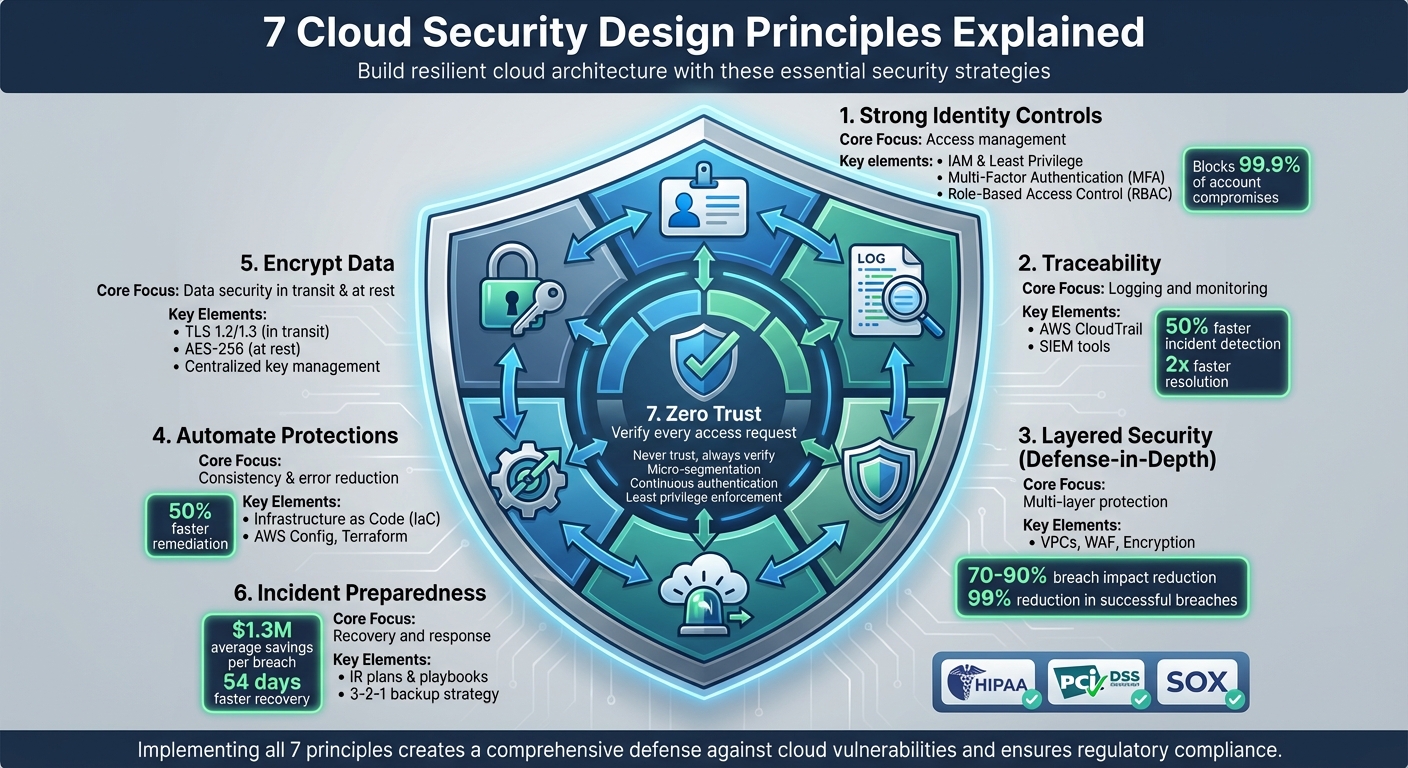
7 Cloud Security Design Principles: Complete Framework Overview
8 Key Cloud Security Concepts Every Engineer Should Know
1. Build a Strong Identity Foundation
When it comes to cloud security, identity and access management (IAM) is your first and most critical line of defense. Unlike traditional network-based security, cloud environments rely on IAM to authenticate and authorize nearly every action – whether it’s an API call, a configuration change, or a data operation. If your identity controls are weak, a single compromised account or exposed key could render all other security measures useless. That’s why strong identity controls are absolutely essential in cloud environments.
At the heart of effective IAM is the principle of least privilege. Every user, application, or service should only have the permissions they need to perform their specific tasks – no more, no less. Start with a deny-all baseline and then carefully grant permissions as needed. Use managed roles or predefined policies as a starting point, and tailor them to your needs. Assign permissions through roles and groups rather than directly to individual users, and use tools to regularly review and clean up unused or overly broad permissions.
Adding multi-factor authentication (MFA) is another straightforward but incredibly effective step. When properly implemented, MFA can block more than 99.9% of account compromise attacks. Make it mandatory for privileged accounts – such as root or global admin users – and for anyone accessing sensitive data or managing IAM settings. By requiring an additional layer of verification, MFA ensures that a stolen password alone isn’t enough to take over an account.
Role-based access control (RBAC) is a practical way to simplify permission management. With RBAC, you assign permissions to roles that align with specific job functions, and then assign users to those roles. For instance, a "ReadOnlyCloudAuditor" role might allow users to view resources and logs without making changes, while a "BillingViewer" role could provide access to cost reports (in USD) without the ability to modify workloads. This structured approach minimizes the risk of granting overly broad permissions, which are a common cause of security breaches.
Machine identities – like service accounts, API keys, and secrets – require the same level of attention as human identities. Use cloud-native service principals or roles instead of relying on long-lived access keys. Store secrets in dedicated management services, and automate their rotation to reduce the risk of exposure. Avoid embedding credentials in source code or container images, and ensure machine identities are limited to only the APIs and resources they need.
Laying down a strong identity foundation doesn’t just protect your cloud environment – it also sets the stage for better traceability, which is the next critical element of cloud security.
2. Enable Traceability
After setting up strong identity controls, the next critical step is ensuring you can monitor and understand everything happening in your cloud environment. This is where traceability comes in – it’s about logging all actions, continuously monitoring those logs, and connecting the dots when something unusual happens. Without detailed logging, you risk missing potential threats, delaying incident investigations, and failing to meet compliance requirements.
Traceability builds on identity controls by adding the visibility you need to stay ahead of security issues. For AWS users, AWS CloudTrail is an essential tool. It captures a detailed record of every API call in your account, documenting who did what, when, and from where. This chronological log includes management events, configuration changes, and resource access attempts. Pairing CloudTrail with Amazon CloudWatch Logs allows you to set up automated alerts for suspicious activity – like attempts to disable security settings or access sensitive data outside regular business hours.
In more complex environments, such as multi-cloud or hybrid setups, tools like Splunk can centralize visibility by collecting logs from multiple sources and correlating events across systems. Organizations with robust logging and monitoring frameworks detect incidents 50% more often and resolve them twice as quickly compared to those with weak traceability. On the flip side, inadequate logging can leave 30% of breaches undetected for over 200 days.
To strengthen your defenses, integrate logs with automated alerting systems. For instance, you can configure AWS Lambda to revoke credentials immediately if CloudTrail flags unusual API activity. Similarly, Amazon GuardDuty can use machine learning to identify suspicious patterns in your logs. This kind of automation dramatically reduces both your mean time to detect (MTTD) and mean time to respond (MTTR) to security incidents.
Make sure to enable logging for all management events, retain logs for at least 90 days, and forward them to a SIEM for deeper analysis. Additionally, turn on VPC Flow Logs to gain insight into network traffic, especially for data flows that might bypass application-level logging. Traceability isn’t just about catching bad actors after the fact – it’s about creating a proactive system that works alongside your identity controls to provide multiple layers of protection.
3. Apply Security at All Layers (Defense-in-Depth)
Once you’ve established traceability, the next step is ensuring that no single point of failure can compromise your cloud environment. This is where defense-in-depth comes into play – a strategy that layers independent security controls throughout your infrastructure. The idea is simple: if one layer is breached, the others still stand between attackers and your sensitive data. This layered approach works hand-in-hand with the identity and traceability measures you’ve already put in place.
The old model of perimeter security – where everything inside the firewall is automatically trusted – just doesn’t cut it in a cloud environment. Cloud architectures are distributed, API-driven, and dynamic, requiring security measures at every level: from the edge network to data storage. AWS’s Well-Architected Framework highlights this by stating:
"Apply security at all layers with a defense-in-depth approach to protect edge of network, VPC, load balancing, instances, OS, application, and code."
This underscores the importance of having multiple, independent controls in place.
Building Layers of Defense
Start by segmenting your network with VPCs and private subnets, and tighten access using security groups that block all traffic except for essential ports. Add a Web Application Firewall (WAF) to filter out malicious requests and implement DDoS protection to counter large-scale attacks.
At the application layer, focus on securing your code. Use input validation to prevent injection attacks, deploy APIs behind gateways that enforce authentication and rate limiting, and conduct regular vulnerability scans for containers and serverless functions.
When it comes to the data layer, encryption is your best friend. Use 256-bit AES encryption for data at rest and TLS for data in transit. Classify your data based on sensitivity, and implement fine-grained access controls to ensure that even if upper layers are breached, your data remains secure.
Real-World Impact of Layered Security
Layered defenses drastically reduce the chances of a successful attack. For instance, during a 2023 AWS incident, a network-level DDoS mitigation failed. However, thanks to VPC isolation, instance firewalls, and application-layer encryption, the attack’s impact was contained, limiting data exposure and reducing damage by 70-90%. Organizations that adopt a multi-layered approach report up to a 99% reduction in successful breaches. Controls like MFA and encryption alone can block 80% of attacks that bypass perimeter defenses.
Putting It into Practice
To make defense-in-depth a reality, leverage infrastructure as code tools to deploy VPCs, security groups, IAM policies, and encryption settings consistently across your environment. Enable flow logs and centralize them in a SIEM solution to monitor for unusual activity. Regularly audit your configurations with tools like AWS Config to catch issues before they become vulnerabilities. By integrating these layers, you can create a resilient cloud architecture that aligns with your broader security goals.
4. Automate Security Best Practices
Relying on manual security processes can lead to errors – whether it’s setting up firewall rules, deploying patches, or performing compliance checks. Each step introduces the potential for misconfigurations that attackers could exploit. Automation changes the game by treating security controls as code, stored in version-controlled templates. This ensures consistent deployment, scales efficiently, and removes the guesswork and inconsistencies that come with manual efforts.
How Automation Reduces Human Error
Take AWS Systems Manager, for example. It automates patch management by identifying vulnerabilities, testing patches, and rolling them out across thousands of EC2 instances – all without causing downtime. Similarly, tools like AWS Config and Azure Policy continuously monitor resources, comparing them against predefined benchmarks. They can flag issues, such as publicly accessible S3 buckets, and even trigger workflows to fix them automatically.
Integrating Automation into Your Workflow
To embed security into your development process, use Infrastructure as Code (IaC) tools like Terraform or AWS CloudFormation. These tools allow you to define security elements – like security groups, IAM policies, and encryption settings – consistently across all environments. By incorporating security scans into CI/CD pipelines, you can catch misconfigurations early. Many organizations report cutting remediation times in half, significantly reducing the window of opportunity for attackers.
Automation not only minimizes human error but also establishes repeatable, auditable processes that scale effortlessly. These practices align smoothly with broader cloud security strategies, ensuring a proactive and consistent approach to safeguarding your systems.
sbb-itb-760dc80
5. Protect Data in Transit and at Rest
To keep sensitive information safe, it’s essential to encrypt data both while it’s moving (in transit) and when it’s stored (at rest). Protecting data in transit involves encrypting information as it travels between clients, services, or regions. This ensures that attackers can’t intercept or tamper with API calls, database connections, or cross-region data transfers. On the other hand, data at rest is safeguarded by encrypting disks, databases, object storage, backups, and snapshots. This way, even if storage devices or accounts are compromised, the data remains unreadable without the correct decryption keys.
Encryption Standards That Work
For securing data in transit, use TLS 1.2 or 1.3 for HTTPS endpoints, database connections, and service APIs. Strong setups rely on AES-GCM encryption and modern key exchanges, like ECDHE, while steering clear of outdated protocols and weak ciphers. When it comes to data at rest, AES-256 is the go-to standard. This encryption method is widely used across block storage, object storage, and managed databases, often backed by FIPS 140-2–compliant cryptographic modules for workloads bound by U.S. regulations.
Practical Implementation
To enforce secure communication, redirect all HTTP traffic to HTTPS at load balancers or API gateways. Internally, encrypt service-to-service communication within Kubernetes clusters or virtual machines using service meshes or mutual TLS (mTLS), rather than depending solely on perimeter defenses. For storage, enable encryption by default across all types – block, object, and file storage, as well as managed databases, logs, and backups. Use centralized key management services to handle encryption keys instead of embedding them in code or configuration files. Automate certificate issuance, rotation, and renewal through cloud certificate managers or ACME-based tools to prevent errors or lapses in security. This multi-layered encryption approach strengthens your overall defense strategy, ensuring data remains secure at every stage.
Take this example: A U.S.-based e-commerce platform uses TLS 1.3 at its load balancers and employs mTLS within its service mesh to protect internal communications. Customer order data is stored in a managed database encrypted with AES-256, while snapshots, logs, and archives are also encrypted using customer-managed keys. Automated policies ensure no unencrypted resources are created. This setup not only meets PCI DSS requirements and state privacy laws but also maintains scalability and performance.
Avoiding Common Pitfalls
Some common mistakes include assuming that a cloud provider’s default settings fully secure all resources, neglecting to encrypt legacy storage, or embedding encryption keys directly within source code or CI/CD pipelines. Additionally, organizations often encrypt primary data but overlook backups, logs, or data shared with third-party services. To address these risks, codify encryption requirements using infrastructure-as-code tools, regularly audit configurations, and review TLS and storage settings to align with the latest best practices. Tools like Cyber Detect Pro can provide valuable insights into TLS hardening and help identify new protocol-level threats, bolstering your cloud security efforts.
6. Prepare for Security Events
It’s not a matter of if a breach will happen – it’s when. That’s why being prepared with a well-defined incident response (IR) plan and a strong backup strategy is essential for quick recovery. Modern cloud security design embraces this mindset, making preparation a cornerstone. Regular simulations and resilient backup strategies are key to staying ahead. Instead of solely focusing on prevention, this approach prioritizes swift detection, containment, and recovery. This naturally aligns with the next principle: adopting a Zero Trust mindset.
An effective IR plan should cover all the bases – clear roles and responsibilities, communication channels, escalation paths, and technical playbooks tailored to common cloud scenarios. Think about situations like compromised IAM credentials, exposed data from misconfigured storage, leaked API keys, or ransomware attacks targeting cloud workloads. Your IR plan should also meet any regulatory or compliance requirements specific to your industry. Regular practice, through tabletop exercises or technical game days, helps teams sharpen their decision-making and communication skills while ensuring runbooks are ready for action. According to a 2023 IBM report, organizations that rigorously test their IR plans save an average of $1.3 million per breach and reduce breach lifecycles by about 54 days.
Backups and recovery strategies are the backbone of your resilience. A solid 3-2-1 backup strategy is a good starting point: keep three copies of your data, store them on two different media, and ensure one copy is offsite. Define your recovery time objective (RTO) and recovery point objective (RPO) for each critical workload. For example, an RTO of 15 minutes and an RPO of 5 minutes would require continuous replication and highly available architectures. On the other hand, less demanding objectives might work with nightly backups and simpler setups. Using immutable or versioned backups and regularly testing your restore processes ensures you’re ready to recover quickly when needed.
Automated playbooks can also play a big role in responding to threats. For example, you can set up playbooks to quarantine suspicious activity and rotate compromised credentials immediately. Centralizing audit and network logs in a security information and event management (SIEM) system allows you to trigger real-time alerts for high-risk events. Additionally, it’s wise to establish relationships with incident response firms, cloud provider support teams, and legal counsel ahead of time. Prepare communication templates for executives, customers, and regulators to streamline coordination during a crisis and integrate these steps into your broader cloud security strategy.
Resources like Cyber Detect Pro provide insights into cloud-focused security trends, ransomware tactics, and industry-specific threats. Keeping your IR and recovery plans aligned with emerging attack patterns and best practices is critical. By combining a tested IR plan, robust backups, and automated responses, you can reduce downtime, cut costs, and maintain business continuity – even in the face of security incidents.
7. Adopt a Zero Trust Mindset
Relying on the old-school approach of trusting everything within your network perimeter just doesn’t hold up in cloud environments. Zero Trust flips the script with one simple rule: "never trust, always verify." Every single access request must go through authentication, authorization, and encryption tailored to the situation.
Why is this shift so important? Because in the cloud, there’s often no defined perimeter. Think about it: SaaS apps, multi-cloud setups, remote teams, and a sea of APIs make the traditional firewall-at-the-edge model full of holes. If an attacker breaks through in that model, they can roam freely. Zero Trust, on the other hand, focuses on identity, device health, and precise policies, all enforced as close to the resource as possible. This constant monitoring builds on the identity and traceability measures we’ve already discussed.
At its core, Zero Trust is all about continuous verification. Instead of checking credentials once at login and calling it a day, this approach keeps verifying throughout the session. It monitors user behavior, device status, and context like location and time. Tools like SIEM and cloud-native security services come into play here, spotting unusual patterns – like impossible travel or unexpected data access – and triggering automated responses instantly.
Another key piece is micro-segmentation. By isolating resources with strict traffic controls – think VPCs, subnets, security groups, or fine-tuned network policies for containers and serverless functions – you can contain threats. If one segment is compromised, it’s much harder for the damage to spread. This is especially effective against ransomware and lateral movement attacks.
Finally, there’s least privilege access. This means giving every identity only the permissions they absolutely need – and nothing more. To keep this airtight, permissions should be reviewed and adjusted regularly. Together, these measures significantly strengthen your cloud defenses.
For U.S. organizations managing regulated data – whether in healthcare, finance, or retail – these practices aren’t just smart, they’re essential. Breaches in these sectors can lead to millions in fines and damages. Tools like Cyber Detect Pro can help teams stay ahead of the curve, offering insights into Zero Trust strategies and the latest threats targeting industries like banking and healthcare. Staying informed and proactive is key to keeping your cloud architecture secure.
Comparison Table
Here’s a quick look at the differences between IAM roles and permissions, as well as methods to protect data in transit and at rest. These tables simplify the security concepts we’ve covered and provide a handy reference for applying them effectively.
IAM Roles vs. Permissions: How They Work Together
IAM roles and permissions are both crucial for managing access, but they serve distinct purposes. A role is essentially a collection of permissions tied to a specific job or function, such as "Finance Reporting Role" or "Support Tier 1 Role." Permissions, on the other hand, define the exact actions allowed on particular resources, like "read this S3 bucket" or "start these EC2 instances."
| Aspect | IAM Roles | Permissions |
|---|---|---|
| Definition | Grouping of permissions for a specific job function or workload | Specific actions (allowed or denied) on designated resources |
| Granularity | Medium to coarse (role-level access) | Fine-grained (action and resource-specific) |
| Usage | Assigned to users, groups, apps, or services to enable capabilities | Attached via policies to roles or groups to define what actions are permitted |
| Management Effort | Easier to manage at scale; fewer objects to track and audit | More complex if assigned directly; best used with roles or policies |
| Example | "DevOps Engineer" role with access to deploy and monitor systems | "ec2:StartInstances" permission for specific instance IDs in a given region |
Data in Transit vs. Data at Rest: Keeping Information Secure
Protecting data depends on whether it’s actively moving across networks or stored on physical media. Data in transit is vulnerable to interception, while data at rest faces risks like unauthorized access or theft of storage devices.
| Data State | Description | Main Risks | Protection Methods |
|---|---|---|---|
| In Transit | Data moving over networks | Eavesdropping, man-in-the-middle attacks, tampering | TLS/HTTPS, SSH, VPNs (IPSec/SSL), mutual TLS, secure API gateways, certificate pinning |
| At Rest | Data stored on physical or digital media | Unauthorized access, theft, backup exposure | Disk/database/object encryption (e.g., AES-256), customer-managed keys, tokenization, access controls, physical security, key rotation |
For organizations in the U.S. handling sensitive data – like healthcare, finance, or retail – strong encryption, careful key management, and precise access controls are essential. These measures not only help meet regulations like HIPAA and GLBA but also significantly lower the risk of costly breaches.
Conclusion
By incorporating these seven cloud security design principles, you create a solid defense against major cloud vulnerabilities. Focus on establishing a strong identity foundation, enabling traceability, layering security controls, automating protections, encrypting data, preparing for incidents, and adopting a zero trust approach. Together, these steps build a resilient system that can stand up to ever-changing threats while delivering tangible results.
Using strategies like defense-in-depth and automation can significantly minimize the impact of breaches. For example, pairing multi-factor authentication with least privilege access has been shown to reduce unauthorized access risks by 99%, according to industry audits.
For U.S. businesses handling sensitive data under regulations like HIPAA, PCI DSS, or SOX, these principles help ensure compliance and safeguard customer information. This is especially important in a time when misconfigurations and identity management failures are among the leading causes of cloud breaches. Such measures are critical as the threat landscape continues to shift.
With emerging risks like AI-driven attacks and ransomware on the horizon, Cyber Detect Pro offers expert insights to turn these principles into practical strategies. Together, they lay the groundwork for a cloud architecture that can adapt and thrive in the face of evolving cybersecurity challenges.
FAQs
What steps can businesses take to ensure traceability in a multi-cloud environment?
To keep track of activities in a multi-cloud setup, businesses should prioritize centralized logging and monitoring. This approach ensures consistent visibility across all platforms, making it easier to track operations and spot irregularities.
It’s also crucial to implement strict access controls and maintain comprehensive audit trails to hold users accountable. By routinely reviewing and analyzing logs, companies can catch potential security issues early, offering a proactive way to protect their cloud environments.
What are the advantages of using a Zero Trust model for cloud security?
Adopting a Zero Trust model for cloud security brings a range of benefits by ensuring every access request undergoes strict verification, no matter where it originates. This method helps close security gaps by granting access strictly on a least-privilege basis, meaning users or systems only get the permissions they absolutely need.
This model also addresses risks like insider threats and unauthorized access by requiring rigorous identity checks and maintaining ongoing monitoring. By implementing these proactive steps, organizations can significantly bolster their defenses and safeguard their cloud environments against the ever-changing landscape of cyber threats.
How can automating security tasks help minimize human errors in cloud environments?
Automating security tasks minimizes human errors by eliminating manual, mistake-prone processes. Automation ensures that tasks are carried out consistently and accurately, significantly lowering the chances of misconfigurations or missed vulnerabilities.
It also speeds up threat detection and response, enabling quick identification and resolution of potential risks that might otherwise slip through the cracks with manual efforts. This not only bolsters the security of cloud environments but also allows teams to dedicate their time to higher-level, strategic initiatives.